

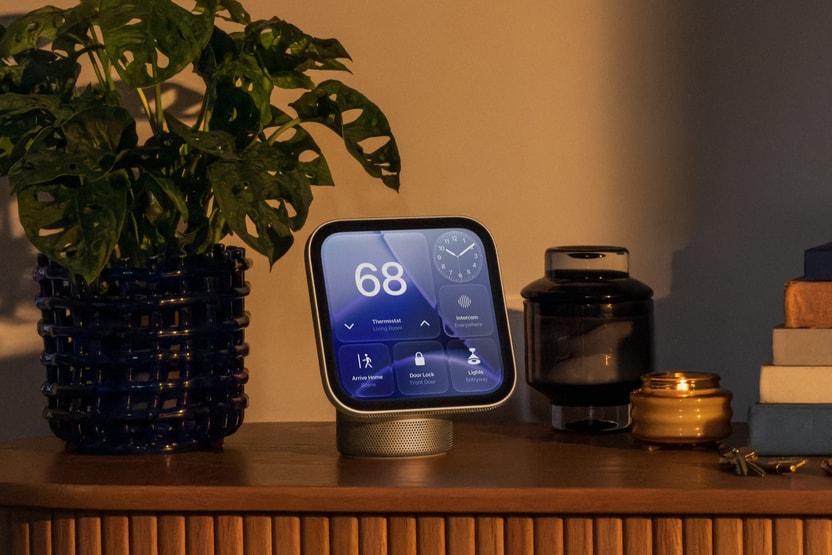
Amazon Echo Show has an established place in the home. Can Apple HomeView offer something better?
Before Apple HomeView, Amazon Echo Show has spent years building a place in people’s homes, giving users a screen for video calls, music, recipes, smart home controls and other everyday tasks. Its range now includes several screen sizes, from compact displays to larger models designed to show household information or play video. That variety has helped make Echo Show an option for people with different budgets and needs.
Apple is now entering that market with HomeView, a seven-inch smart display built around Siri AI, FaceTime, personal information and controls for compatible smart home devices. The company is taking a different route from Amazon: instead of offering a family of screens at different sizes, it is introducing a device designed to bring its services and connected-home experience into one shared place.
The price difference immediately raises a question for buyers. HomeView starts at an announced US price of $299, while Amazon’s newer Echo Show 8 and Echo Show 11 were announced at $179.99 and $219.99, respectively. That puts Apple’s device $79.01 above the Echo Show 11 and $119.01 above the Echo Show 8 before taxes, shipping or other costs.
Paying more does not automatically mean getting less value. Someone who already uses an iPhone, FaceTime, Apple Music and Apple Home may find it useful to have those services available on a shared display. Another buyer may care more about screen size, video streaming and keeping costs down, making an Echo Show a better fit.
The question now lies in what the extra money buys, and whether those benefits are important enough to justify the price.
There is also a difference in the evidence available for each product. Echo Show has an established user base, so its existing features and everyday limitations can be examined through published reviews and owner experiences. HomeView, announced on October 13, 2026, is scheduled to reach its initial markets from November 13. Journalists have already had opportunities to examine the device, but those early impressions are not the same as months of use in ordinary homes.
This comparison examines what each device offers, where the differences matter and what buyers should check before spending their money.
What Amazon Echo Show offers today
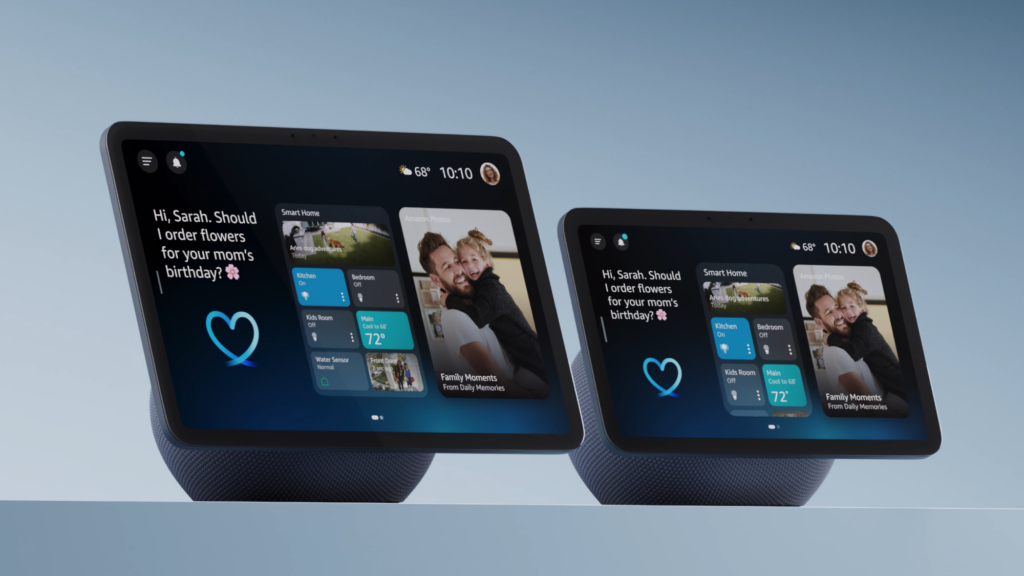
Echo Show is not one device with one fixed set of features. It is a range of smart displays built around Alexa, with different screen sizes and capabilities depending on the model.
The smaller displays are suited to places where people need quick access to information, such as a bedside table or kitchen counter. Larger models offer more room for video, household information and controls. The Echo Show 15 and Echo Show 21, for example, provide much larger screens than the compact models and can be mounted on a wall.
The newer Echo Show 8 and Echo Show 11 take a different approach from earlier designs. Amazon has built both around Alexa+, its newer AI assistant, and added updated processing hardware, sensors and a redesigned audio system. The company says the displays use front-facing stereo speakers and a custom woofer for fuller sound. Those are manufacturer claims, so their real-world sound quality still needs to be judged in the context of the room and the listener’s expectations.
Alexa is also major part of the experience. Users can ask questions, set timers, manage reminders, control compatible smart home accessories and access supported entertainment services. Depending on the model, the screen can also be used for video calls, recipes, camera feeds and other household tasks.
One advantage of the range is choice. A buyer who only needs a small screen for reminders and quick voice commands does not have to purchase a large wall-mounted display. Someone who wants a bigger screen for a shared space can look at a larger model instead.
That flexibility matters because smart displays do not serve the same purpose in every home. A device used mainly for kitchen timers has different requirements from one intended to show camera feeds, help manage a household calendar or play video throughout the day.
Amazon also has an advantage in accumulated consumer experience. Published reviews and owner discussions can reveal issues that are difficult to identify during a product demonstration, including the way a screen behaves over time, how people respond to its interface and whether certain features become annoying after repeated use.
That does not mean Echo Show is automatically the better product. It means buyers have a wider range of existing experiences to consider, while HomeView still has to prove how well its approach works outside a controlled demonstration.
Apple HomeView: a different kind of smart display

HomeView is Apple’s first dedicated smart display, designed to bring personal information, entertainment and smart home controls together in one place. Its seven-inch Liquid Retina screen is available in a tabletop model with a speaker base and a separate wall-mounted version for spaces such as hallways and entryways.
The display is built around Siri AI and Apple Intelligence. Apple says HomeView can recognise up to six people and adjust the information shown to each person, including supported content from Messages, FaceTime, Calendar, Reminders and Find My.
This could make a difference in a shared home. Rather than showing the same general information to everyone, the device is designed to bring up relevant content for the person using it. A family member might want to check a calendar, while someone else wants to make a call or control the lights.
The company is also placing considerable importance on the way HomeView connects with other Apple devices. When paired with a compatible Apple Intelligence-enabled iPhone or iPad, Siri AI can use personal context to provide more relevant responses and help with tasks across supported apps. Some of these features therefore depend on the devices a person already owns, rather than working independently of the Apple ecosystem.
That connection is central to HomeView’s appeal, but it also creates a limitation. Someone who does not use compatible Apple devices may not get the same experience as an iPhone owner who already relies on Apple’s services.
HomeView’s advertised combination of music, video and smart home controls might suggest that it can run all the familiar Apple entertainment services directly on its screen. But, early reporting shows that this is not the case for every service.
The Verge has reported that some notable services, including Apple TV, Apple Books audiobooks, Apple Music Classical and Apple News Plus, are not natively supported on HomeView and require a connected iPhone for access through AirPlay. The device also does not have a conventional App Store which is an important limitation for buyers who expect to open streaming apps directly on the display.
HomeView is therefore best understood as a shared Apple-focused home display, not just an iPad with a stand. Its value will depend on whether its personalised interface, smart home controls and connection with other Apple devices make everyday tasks easier.
Apple HomeView vs Amazon Echo Show: the main differences
The table below compares HomeView with selected Echo Show models. Prices are announced US prices, and capabilities can vary by model, software version and region.
| Feature | Apple HomeView | Echo Show 8 | Echo Show 11 |
| Announced US price | $299 | $179.99 | $219.99 |
| Display | 7-inch Liquid Retina | 8-inch display | 11-inch display |
| Voice assistant | Siri AI | Alexa+ | Alexa+ |
| Personalisation | Designed to recognise up to six people | Personalised features through Alexa+ | Personalised features through Alexa+ |
| Smart home controls | Apple Home and compatible accessories | Alexa-compatible devices | Alexa-compatible devices |
| Built-in smart home hub | Designed to work with Apple Home; check accessory requirements | Yes | Yes |
| Entertainment | Apple services and supported third-party apps, with reported native-app limits | Supported media services | Supported media services |
| Video calling | FaceTime | Supported calling features | Supported calling features |
| Wall mounting | Dedicated wall-mounted version; mount costs extra | Depends on installation and accessories | Depends on installation and accessories |
| Main appeal | Apple integration and personalised household information | Lower entry price and compact screen | Larger screen with Alexa+ |
The prices and headline specifications come from the companies’ published product information. The table does not mean every service or feature is available in every country. Buyers should check the current details for their chosen model before making a purchase.
The price difference is clear but the value depends on what you need
HomeView’s starting price of $299 puts it above Amazon’s newer Echo Show 8 and Echo Show 11. But buyers should not assume that the more expensive product will offer a better experience in every area.
For someone who uses an iPhone throughout the day, HomeView could bring useful features into a shared space. The ability to view supported personal information, make FaceTime calls and control compatible Apple Home accessories may be worth paying for if those activities are already part of the household’s routine.
But the calculation changes for someone who mainly wants a screen for timers, weather, music and general voice commands. Those tasks do not necessarily require a device that is closely tied to Apple’s ecosystem, and a lower-priced Echo Show may be enough.The Echo Show 8 costs $119.01 less than HomeView at the announced US prices. The Echo Show 11 costs $79.01 less while offering a larger screen. That leaves Amazon with a clear advantage on the price-to-screen-size comparison, although screen size alone cannot tell us which product offers better value overall.
HomeView’s wall-mounted option adds another expense. Apple has announced three mounting options: a USB-C wall connector starting at $59.95, an AC wired mount starting at $79.95 and a PoE wired option priced at $129.95, scheduled for early 2027. These are US prices, and the appropriate installation method depends on the space and available power connection.
The additional cost is worth considering because wall mounting changes more than the appearance of the device. The tabletop version includes a speaker base, while the wall-mounted version has a different sound setup. A buyer choosing the wall-mounted model should not assume they are getting exactly the same physical arrangement as the tabletop version.
There is also the cost of compatible accessories to consider. Neither display can automatically control every smart device in a home, so a buyer may need to replace or add accessories to get the desired setup. Subscriptions can also affect the total cost of some services, including certain camera features.
For that reason, the advertised device price is only one part of the purchase. The more useful calculation is the total cost of the setup and the value of the features the household will use regularly.
A seven-inch screen is convenient, but it is not for every job
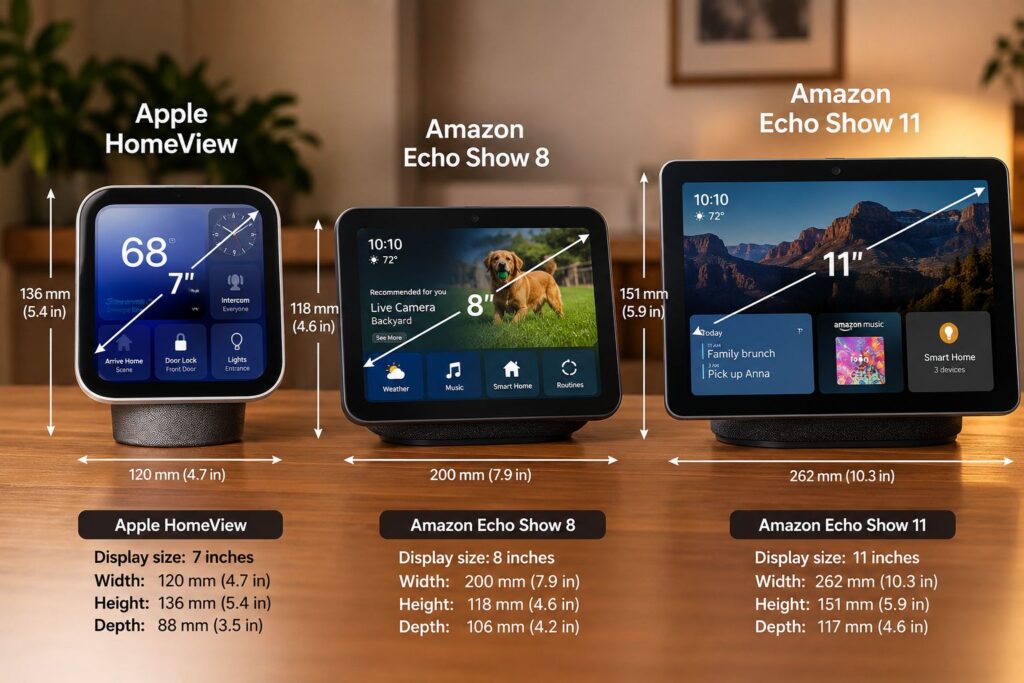
HomeView can show a calendar, display photos, provide music controls, present supported smart home controls and handle video calls. However, the screen’s size also sets limits.
Someone standing beside a kitchen counter may find seven inches sufficient for a timer or recipe instructions. A person watching video from across a room may prefer a larger display, especially if the device is expected to serve as a regular entertainment screen.
The Verge’s hands-on report described HomeView as smaller than the journalist had expected. That observation is useful because product images can make it difficult to judge the actual size of a device. It remains an early impression, though, rather than a finding from long-term use in different homes.
Amazon’s range gives buyers more flexibility here. The Echo Show 8 offers a slightly larger display, while the Echo Show 11 provides considerably more screen space. Larger models such as the Echo Show 15 and Echo Show 21 offer another option for households that want a more visible dashboard or a larger screen for supported entertainment.
A bigger screen is not automatically better. It needs more room, and a device that dominates a small bedside table may be less convenient than a compact display. The important question is whether the screen size matches the place where it will be used.
HomeView’s design also introduces a choice between tabletop and wall mounting. A tabletop unit can sit on a counter or side table, while the wall-mounted version may work better near an entrance or in a shared area. The latter requires separate mounting hardware, so the installation should be part of the buying decision from the start.
The design comparison therefore comes down to priorities. HomeView offers a compact screen tied closely to Apple’s ecosystem; Echo Show gives buyers more choice over size and price.
Siri AI vs Alexa+: which assistant can do more for you?
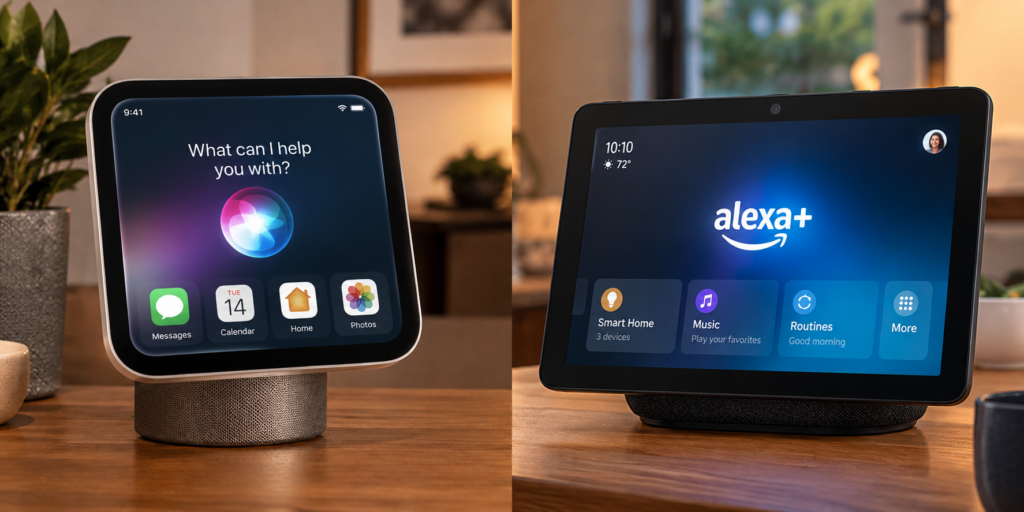
Both HomeView and newer Echo Show models are being positioned around more capable AI voice assistants, but their usefulness depends on how well they complete real tasks, not simply on how advanced their companies say they are.
Apple says HomeView can provide more personal responses when paired with a compatible Apple Intelligence-enabled device, using supported information from apps such as Messages and Calendar. That could make the assistant more useful for people who already keep their personal information in Apple’s services.
Imagine asking for information that depends on more than one app. A basic voice assistant might answer a general question or set a timer. A more capable assistant could, in principle, use relevant information from a calendar and messages to provide a more specific answer. That is the type of experience Apple is trying to build, although the usefulness will depend on how reliably Siri AI performs in everyday use.
Amazon is pursuing a similar goal with Alexa+. The newer Echo Show 8 and Echo Show 11 were built around updated processing hardware and sensors intended to support more natural, personalised interactions. Amazon says the devices are designed to help Alexa+ handle a wider range of tasks and provide more proactive assistance around the home.
There is still a question of reliability. In its early hands-on coverage, TechRadar’s Jacob Krol said he was able to try basic smart home controls, routines and music playback on HomeView, but also noted that he sometimes had to repeat a request. He had not yet tested the device in his own home, so his experience was limited to Apple’s demonstration space.
That is a useful distinction. Seeing Siri AI complete a task during a demonstration does not establish how well it will work every morning, with background noise or when different people make requests at the same time. The same standard should apply to Alexa+.
For now, buyers should be cautious about choosing either product solely because of its AI claims. What matters is whether the assistant can handle the requests you make regularly, work with the services you use and complete tasks without forcing you to repeat yourself.
Smart home controls: compatibility matters more than the feature list
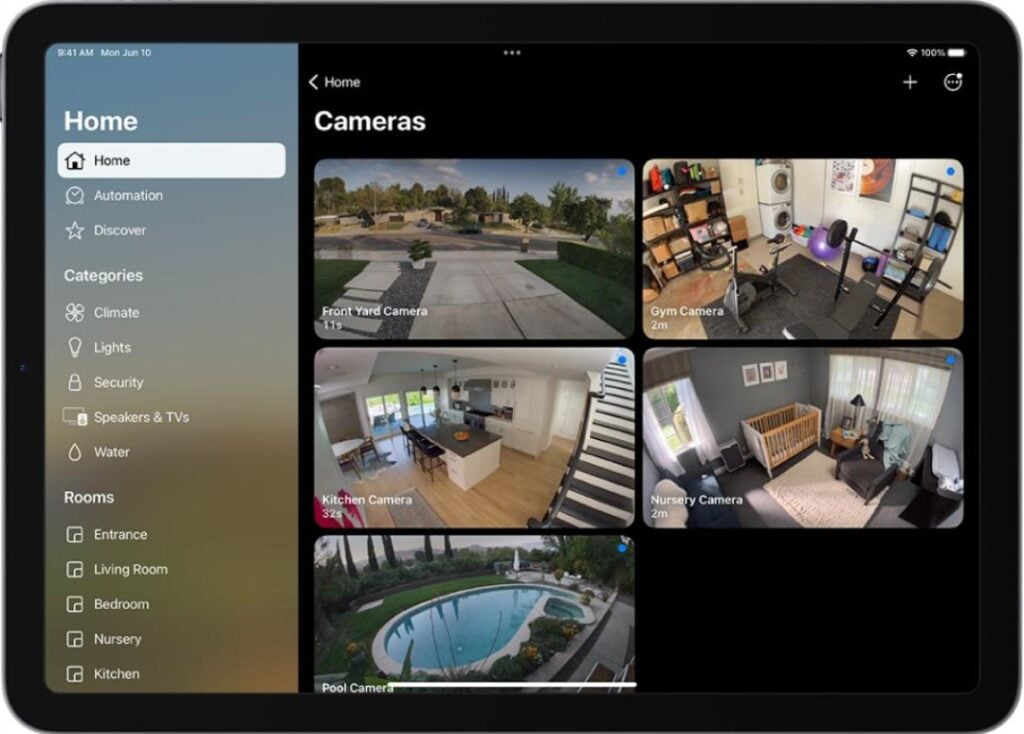
Both devices are designed to control connected-home accessories, but the first question is whether they work with the equipment you already own.
HomeView connects with Apple Home and compatible accessories. Apple says users can control supported lights, thermostats, locks and blinds, as well as view feeds from compatible cameras. Its Home Camera interface can display up to nine feeds at once, which may be useful for someone who wants to check different parts of a property from a single screen. Some camera features require compatible equipment and an iCloud+ subscription.
The benefit is straightforward for someone who already uses Apple Home. Instead of finding an iPhone, opening the Home app and selecting an accessory, the user can control supported devices through the display or by speaking to Siri.
Amazon offers a similar role through Alexa. The newer Echo Show 8 and Echo Show 11 include a built-in smart home hub, and users can control compatible devices through voice commands or the touchscreen. Available features still depend on the accessory and the chosen model.
This is where a product comparison can become misleading if it stops at a checklist. Both displays can control smart home devices, but that does not mean they support every device in the same way. A product may work with one platform but not another, or it may support basic controls while missing a feature the owner wants.
The smart home standard used by an accessory can also matter. Buyers should check the specific product’s compatibility information instead of assuming that support for a general standard guarantees every function will work across all platforms.
Apple is also introducing HomeView alongside a new set of home accessories developed with LG and Schneider Electric. Reuters reported that the wider product launch is part of the company’s effort to make it easier to connect and manage smart home devices. That strategy could make setup simpler for people starting from scratch, but the wider ecosystem will need to demonstrate that it works reliably with the products people actually want to use.
For a household already built around Apple Home, HomeView is a natural product to investigate. An Alexa-based home may be easier to manage with Echo Show. Someone starting fresh should compare the supported accessories, the cost of building the setup and the services available in their country before choosing a platform.
Entertainment is a potential weak point for HomeView
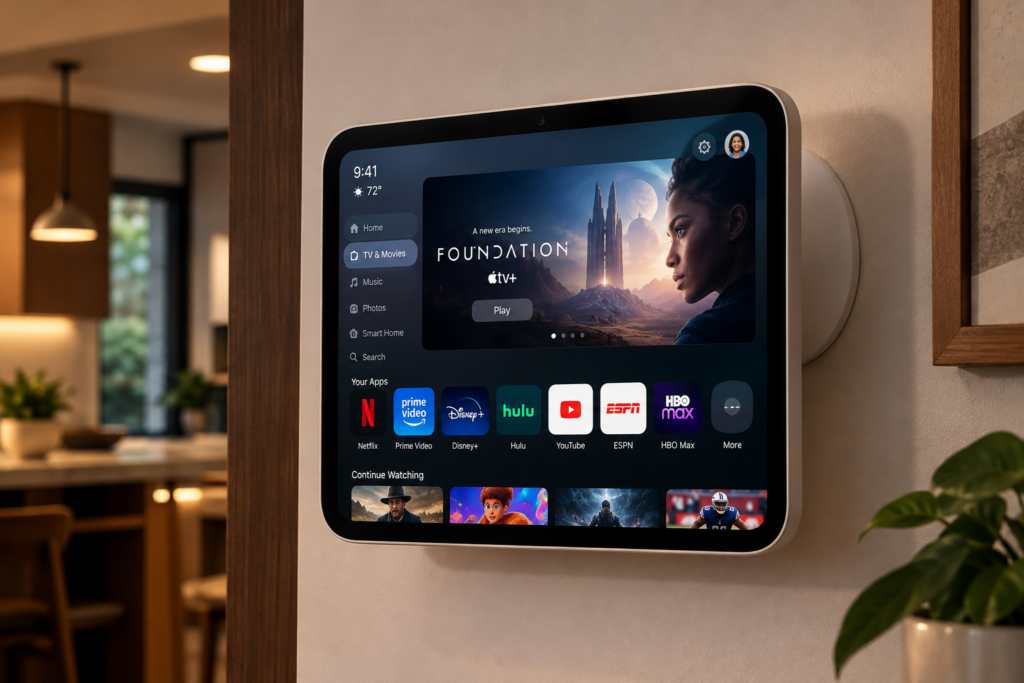
A smart display can be useful for entertainment, but the screen alone does not guarantee a good viewing experience. The apps available on the device, whether they run directly on the screen and how easily people can start playback are all important parts of the decision.
HomeView supports an Apple-focused experience for music, podcasts, photos and other household activities. Apple’s launch materials promote services such as Apple Music and Apple Podcasts, alongside compatible third-party audio and video apps. Handoff also lets users move supported audio playback from an iPhone to the display.
The difficulty is that some services buyers may expect to run directly on the screen are not natively supported. The Verge has reported that Apple TV, Apple Books audiobooks, Apple Music Classical and Apple News Plus require a connected iPhone for access through AirPlay rather than running directly on HomeView. The device also has no conventional App Store.
This is an important distinction because a buyer might see Apple TV featured in promotional material and assume they can open the service on HomeView in the same way they would on an Apple TV device. The Verge noted that the AirPlay requirement was included in the small print of Apple’s announcement.
AirPlay still provides a way to use supported content, but it adds a step. Instead of selecting a service directly on the display, the user needs a compatible iPhone to start or control the playback. That may be acceptable for occasional use, but it could become frustrating for someone who wants the screen to act as a small television.
Amazon has a more established approach to native streaming on its smart displays. The Verge notes that competing displays such as Echo Show can stream supported services including Prime Video without requiring a phone connection. Some Echo Show models also support Fire TV features, giving users access to a more television-like interface. Exact service support depends on the model and region.
That gives Echo Show an advantage for buyers whose main priority is video streaming. Anyone buying a device mainly for entertainment should check the supported apps for their preferred model before spending money.
There is another point to keep in mind: HomeView’s software could change after launch. The Verge’s findings describe the reported support at the time of its October 2026 article. Apple may add support or change the experience later, but buyers should make their decision based on confirmed features rather than promises about what might arrive.
For now, entertainment is one of the clearest areas where consumers should investigate HomeView before buying. Its integration with Apple’s services may appeal to existing users, but the lack of native support for some services could limit its usefulness as an all-purpose media screen.
Sound quality: do not judge the speakers by the specifications alone
Someone who only needs timers and reminders may not care much about audio quality, while a person who listens to music in the kitchen may want fuller sound from a single device.
Apple says HomeView uses two full-range drivers in the display, with a down-firing woofer and two force-cancelling passive radiators in the tabletop base. The company also says its audio system adjusts loudness and bass response through computational audio. The wall-mounted version has a different speaker arrangement because it does not use the tabletop base.
Amazon’s newer Echo Show 8 and Echo Show 11 use front-facing stereo speakers and a custom woofer. The company describes them as its best-sounding smart displays at launch. These specifications suggest that audio is an important part of both products, but they do not establish which one will sound better in every setting.
Speaker placement can change the experience. A device on a kitchen counter may sound different from one mounted on a wall, and a small room places different demands on the speakers from a larger living area. The type of music and the volume also matter.
There is not yet enough independent, long-term comparative evidence to declare a sound-quality winner between HomeView and the newer Echo Show models. A proper comparison should listen to both devices in similar conditions, with the same music and similar volume levels.
Until that evidence is available, buyers should treat the published audio details as useful specifications rather than proof of superior sound. If music is a major reason for the purchase, independent listening tests will be more useful than either company’s marketing language.
Privacy and advertising: what happens when the screen is always there?
A smart display may be used in a room where people talk, make calls, view personal information and manage cameras or door locks. That makes privacy and control over the screen’s behaviour important parts of the buying decision.
Apple says HomeView was designed with privacy and security in mind. The device can recognise household members and display supported personal content, while certain compatible camera features use Apple’s Home security services. Some features depend on the user’s existing devices and subscriptions, so buyers should check the specific requirements rather than assume every feature works independently.
The personalisation features also raise practical questions. What happens if the device does not recognise the person correctly? Which information appears on a shared screen? Does the user need a paired iPhone nearby? Reuters reported that HomeView relies on a recently unlocked iPhone connected to the same home network to access private data from messages and calendars.
That requirement is important because HomeView’s personal features are not entirely separate from the user’s Apple devices. For some buyers, this may be an acceptable part of the setup. Others may prefer a device that better fits a mixed household or a home where not everyone uses an iPhone.
Echo Show owners also need to review privacy settings for the exact model they choose, including camera and microphone controls, account permissions and connected services.
Advertising is another consideration. Some Echo Show owners have complained in online discussions about promotions and recommendations appearing on their screens. These are individual reports rather than a representative survey, so they do not establish how common the experience is across the entire Echo Show range. Still, the complaints are relevant to buyers who want a display that mainly shows household information and controls.
TechRadar’s early HomeView coverage also highlighted Apple’s more focused approach to the interface. Its reviewer noted that the device does not use notifications in the same way as a phone and described the experience as designed to be useful when needed without constantly asking for attention. That is an early impression from a hands-on session, not proof of how every household will experience the product.
The difference may matter to people who do not want another screen full of interruptions. However, privacy should not be reduced to whether a device shows advertisements. Buyers should also consider what information is processed, what controls are available and how the device handles personal content.
Both products combine microphones, screens, accounts and connected services. The sensible approach is to understand the settings and requirements before putting a smart display in a shared room.
What early homeView reviews tell us
Early hands-on reports provide useful clues about HomeView’s design and interface, but they need to be read with care. A demonstration can show how the device is meant to work; it cannot fully establish how reliable or convenient it will be after months of ordinary use.
TechRadar’s Jacob Krol report points to both the promise and the uncertainty surrounding the device. A familiar interface may make HomeView easier for existing Apple users to learn, while the ability to bring several household controls together could reduce the need to reach for an iPhone. But the reliability of Siri AI is central to whether those benefits will hold up in daily use.
Reuters has also highlighted the challenge facing Apple as it enters a market where Amazon and Google already have established smart home products. Analysts quoted by the news agency questioned whether Apple’s AI capabilities would provide enough benefit beyond basic voice commands to attract consumers.
These reports do not prove that HomeView will succeed or fail. They identify the questions that matter most: whether Siri AI performs reliably, whether the device makes smart home controls easier to use and whether the Apple-focused experience is worth the price.
There is not yet a strong basis for claiming that HomeView is more reliable, more private or better for everyday use than Echo Show across the board. Those conclusions require more testing in ordinary homes and more direct comparison between the products.
Which smart display should you buy?
The best choice depends on the job you expect the device to do and the technology already in your home. HomeView is built around Apple’s services, while Echo Show offers more screen sizes and an established Alexa platform. The following recommendations reflect those differences rather than treating one product as the winner in every situation.
Choose Apple HomeView if you already rely on Apple’s services
HomeView is worth considering if you regularly use an iPhone, FaceTime, Apple Music, Calendar and Apple Home. Its ability to bring supported personal information and smart home controls onto a shared screen could be useful in a household where several people use Apple devices.
The seven-inch display may also suit someone who wants a compact screen for a counter or side table rather than a large wall-mounted display.
However, check the requirements for the personal features you want and the native app support for the services you use. The reported need for AirPlay to access some entertainment services is particularly important if you expect the device to work as a small television.
Choose Echo Show if screen size and price matter more
Amazon’s newer Echo Show 8 and Echo Show 11 cost less than HomeView at their announced US prices. The 11-inch model also provides more screen space than Apple’s seven-inch display, while the range offers additional options for people who want something smaller or larger.
Echo Show may also be the easier fit if your smart home routines already run through Alexa. You may be able to add the display to an existing setup instead of changing platforms.
Check the features of the exact model before buying. Screen size, entertainment support and smart home capabilities vary across the range, and regional app availability can affect the experience.
If you mainly want to watch videos, investigate Echo Show first
The reported limits on HomeView’s native streaming apps make this an important distinction. If your main reason for buying a smart display is to open video services directly on the screen, Echo Show has a clearer established route through supported streaming services.
HomeView may still be useful for music, personal information and smart home controls, but buyers should not assume that its Apple branding guarantees native access to every Apple entertainment service.
If you are building a smart home from scratch, compare the whole setup
Do not choose a platform based only on the display. Check whether the lights, locks, cameras and other accessories you want to buy work with the system, what features they support and whether additional hubs or subscriptions are needed.
It is also worth thinking about who will use the display. A household that shares one screen may value personalisation and privacy controls, while another may mainly need a larger display for shared information.
The cost of compatible accessories can change the value of the entire setup. A cheaper display may become more expensive if it requires extra equipment, while a more expensive one may be worthwhile if it works with devices you already own.
Is Apple HomeView available in Nigeria?
Nigeria was not included in Apple’s announced initial HomeView launch markets. The company listed the United States, United Kingdom, Canada, Australia, New Zealand, Singapore, India and South Africa, with availability scheduled to begin on November 13, 2026. Apple also said Siri AI on HomeView would initially be available in English in those markets.
For buyers in Nigeria, this means official local availability was not confirmed in the initial announcement. Anyone considering an imported device should check the seller, warranty terms, power requirements and regional support before paying.
The software is just as important as the hardware. Voice assistant features, entertainment apps, calling services and smart home integrations may not work in the same way everywhere. A device sold overseas may therefore offer a different experience from the one described in a local buying guide or review.
The same checks apply to Echo Show. Before purchasing, confirm the availability of the specific model, the services you want to use and the seller’s warranty arrangements. Do not assume that all advertised features will be available locally simply because the device can be purchased from an overseas retailer.
For Nigerian consumers, regional support should be part of the decision from the beginning. If a product is not officially available through a reliable local channel, the cost and risks of importing it need to be weighed against the benefits.
Frequently Asked Questions
Is Apple HomeView better than Amazon Echo Show?
Neither is better for every household. HomeView may suit people who already use Apple devices and services, while Echo Show offers more screen-size options and lower announced prices for the newer Echo Show 8 and Echo Show 11. The right choice depends on the services you use, your smart home setup and your budget.
How much does Apple HomeView cost?
Apple announced a US starting price of $299. The wall-mounted version requires separate mounting hardware, which starts at $59.95 for the USB-C wall connector. The final cost depends on the installation option and any additional accessories or services required.
How much do the newer Amazon Echo Show 8 and Echo Show 11 cost?
Amazon announced US prices of $179.99 for the Echo Show 8 and $219.99 for the Echo Show 11. Retail prices can change, and the prices in other countries may differ.
Can HomeView run Apple TV and other streaming apps directly?
Not all services are natively supported. The Verge reported that Apple TV, Apple Books audiobooks, Apple Music Classical and Apple News Plus require a connected iPhone for access through AirPlay. Check the latest compatibility details before purchasing if entertainment is a priority.
Can HomeView control smart home devices?
Yes. Apple says the device can control compatible Apple Home accessories, including supported lights, thermostats, locks and blinds. It can also display feeds from compatible cameras. The exact features depend on the accessory, setup and any subscription requirements.
Can Echo Show control smart home devices?
Yes. Echo Show models can control compatible devices through Alexa. The available features depend on the model and connected accessories, and the newer Echo Show 8 and Echo Show 11 include a built-in smart home hub.
Does HomeView work without an iPhone?
Some features, particularly those involving personal context and supported personal information, depend on compatible Apple devices. Buyers should check the requirements for the features they want instead of assuming HomeView will provide the same experience independently of the Apple ecosystem.
Is HomeView available in Nigeria?
Nigeria was not included in Apple’s announced initial launch markets. Buyers should check official availability and regional support before purchasing or importing the device.
Last updated: October 18, 2026