



We’ve all done the “privacy shuffle.” You’re on a crowded bus or in a mid-day meeting, and you need to check a sensitive message or open your banking app. Suddenly, you’re hyper-aware of the person over your shoulder. You tilt the phone toward your chest, angle your body away from the aisle, and dim the brightness until you can barely see the screen yourself.
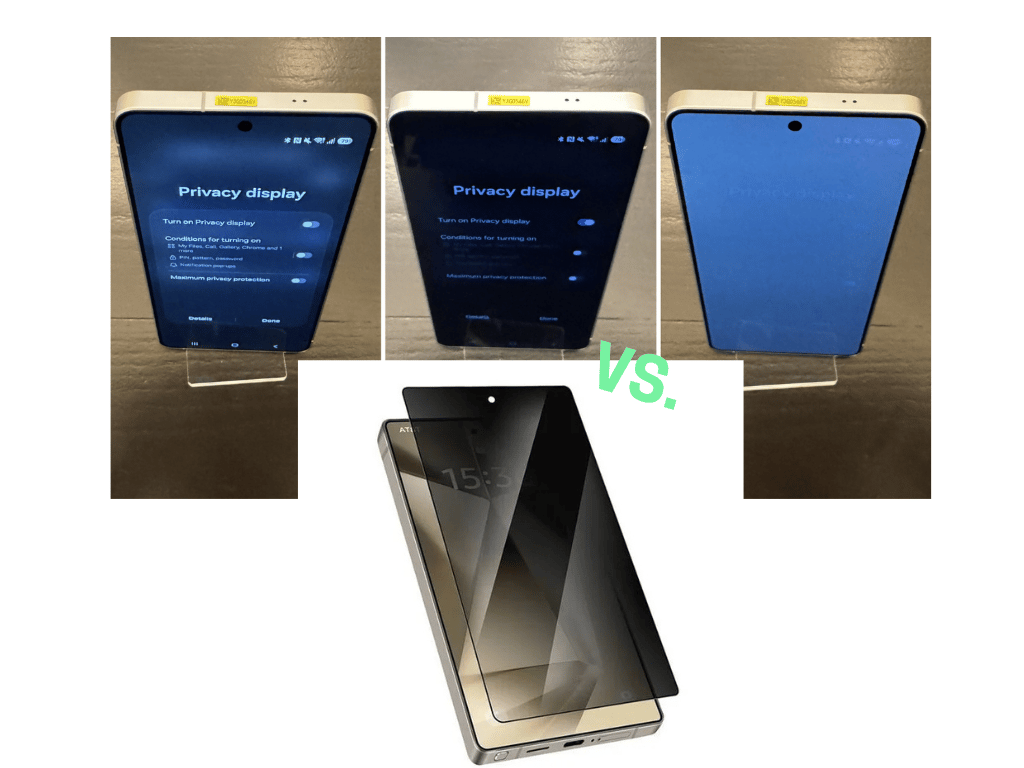
For most of the smartphone era, the only fix was a plastic privacy screen guard—a blunt rectangular, adhesive instrument that narrowed your viewing angles so aggressively the screen looked like it was running at 20% brightness. They were clunky and had to be replaced every few months, yet they sold consistently across the globe.
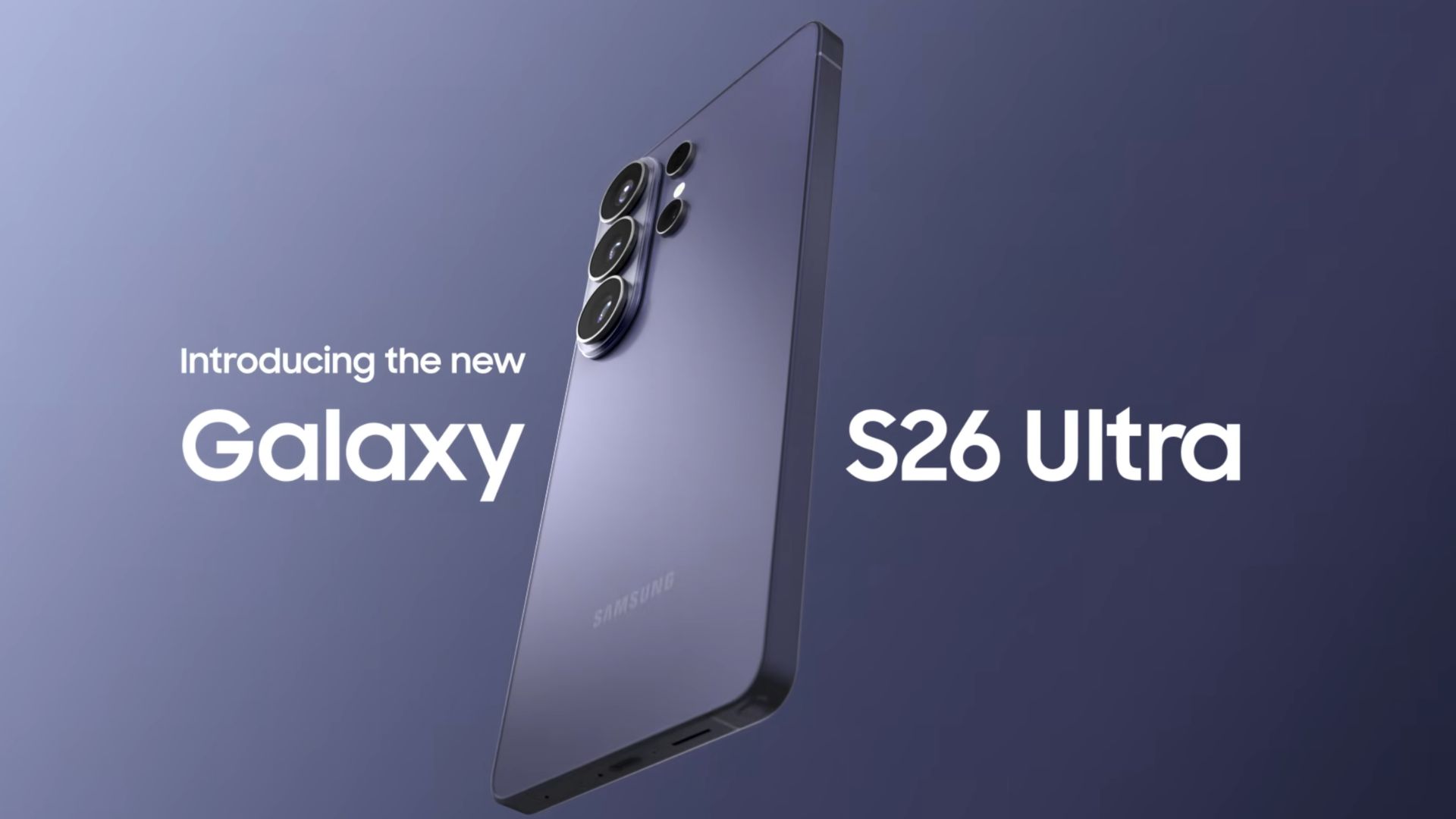
Samsung’s Galaxy S26 Ultra aims to end the era of the stick-on guard. By building Privacy Display technology directly into the screen’s pixels, they’ve created a hardware-level privacy filter that you can toggle on and off. It’s one of the more thoughtful pieces of display engineering we’ve seen in years, with a catch.
But before we look at the trade-offs of that screen, we need to talk about the rest of the phone.
Let’s be realistic: nobody is spending nearly ₦2 million ($1,416) just for a privacy filter. For the S26 Ultra to make sense, the rest of the phone has to show up. While everyone is talking about the screen, Samsung used this update to finally address some of the hardware complaints that have followed the Ultra line for the last two years.
S26 Ultra: Other changes Samsung made to the S25 Ultra flagship phone you should care about
Compared with the Samsung Galaxy S25 Ultra, Samsung focused on refining the core experience with:
- A new M14 OLED display with stronger anti-reflective coating
The Samsung Galaxy S26 Ultra moves to Samsung’s newer M14 OLED panel, replacing the M13 panel used in the Samsung Galaxy S25 Ultra. The update also introduces a third-generation anti-reflective coating that improves visibility outdoors. The panel still supports a 120Hz adaptive refresh rate and QHD+ resolution, but glare reduction and light efficiency see noticeable improvement. - Charging speeds increased to 60W wired and 25W wireless
Samsung finally raised charging speeds after several Ultra generations remained at 45W wired charging. The S26 Ultra now supports 60W wired fast charging and 25W wireless charging, up from the previous 15W wireless charging on the S25 Ultra. The battery capacity remains 5,000 mAh, but the faster charging cuts down the time needed to reach a full charge. - Snapdragon 8 Elite Gen 5 processor
The S26 Ultra upgrades to the Qualcomm Snapdragon 8 Elite Gen 5, replacing the Snapdragon 8 Elite used in the S25 Ultra. The chip brings improvements in CPU and GPU performance along with better power efficiency, which helps extend battery life during heavy tasks such as gaming or video editing. - Larger vapour chamber for thermal management
Samsung expanded the cooling system with a 21% larger vapour chamber compared with the S25 Ultra. The larger cooling surface helps the phone maintain stable performance under load, particularly during gaming sessions, long camera recording, or multitasking with several apps running at once. - Camera aperture improvements for better light capture
The primary 200MP main camera now uses a wider f/1.4 aperture, compared with f/1.7 on the S25 Ultra. The 5× periscope telephoto lens also moves to f/2.9, improving light intake for zoom photography. These changes allow the camera sensors to capture more light, which helps improve low-light photos and overall image clarity. - New front camera sensor with wider field of view
Samsung introduces a new selfie camera sensor with a wider field of view, making group selfies and video calls easier to frame. The upgrade focuses on broader framing and improved detail capture for social video and front-facing photography. - Android 16 with One UI 8.5
The S26 Ultra launches with Android 16 and Samsung One UI 8.5. The software update expands Samsung’s system intelligence tools with features that assist with summarizing information, managing notifications, and editing media directly on the device. - Refined hardware design and internal layout
Samsung made small adjustments to the physical design. The S26 Ultra is slightly thinner and lighter, with more rounded edges compared with the sharper design of the S25 Ultra. Internal layout changes also create space for the larger cooling system and improved thermal management.
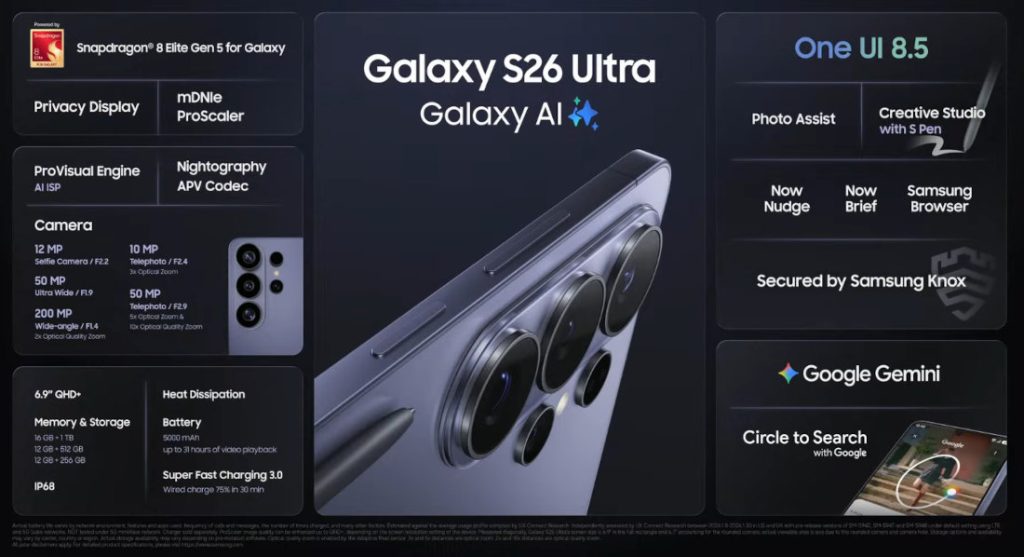
Specifications: Samsung S26 Ultra
| Category | Specification |
|---|---|
| Network | GSM / HSPA / LTE / 5G |
| Body / Build | Glass front (Gorilla Armor 2), glass back, aluminum frame |
| Weight | ~214 g |
| Water Resistance | IP68 dust and water resistant |
| Display | 6.9-inch Dynamic LTPO AMOLED 2X |
| Refresh Rate | Adaptive 1–120 Hz |
| Processor | Snapdragon 8 Elite Gen 5 for Galaxy |
| Operating System | Android 16 with One UI 8.5 |
| RAM | 12GB / 16GB |
| Storage | 256GB / 512GB / 1TB (UFS 4.0) |
| Cameras | Rear: Quad camera: 200MP (main) + 50MP (ultrawide) + 10MP (3× telephoto) + 50MP (periscope 5×) | Selfie: 12MP | Video: Up to 8K video; 4K up to 120fps |
| Battery & Charging | 5000 mAh, 60W wired fast charging, ~25W wireless + reverse wireless |
| Security | Ultrasonic in-display fingerprint + Samsung Knox |
| Extras | S Pen support, stereo speakers |
| Pricing | 256GB (12GB RAM) – ~₦1.7M – ₦1.9M 512GB (12GB RAM) – ~₦1.9M – ₦2.1M 1TB (16GB RAM) – ~₦2.5M – ₦3.2M |
It is a formidable spec sheet, certainly. But in a world where every flagship has a fast chip and a big camera, the S26 Ultra’s identity still hinges on that display.
How the S26 Ultra Privacy Display works
To understand what makes this different, you have to look at how the screen itself was built.
The Privacy Display is a hardware-level achievement built directly into the pixel architecture of the panel. The screen houses two different types of pixels working at the same time. You have wide-angle pixels that act like a standard AMOLED—vivid and visible from any direction—and narrow-angle pixels designed to throw light in a tight, forward-facing cone.
When you’re just scrolling through TikTok at home, both sets of pixels work together. But the moment you toggle Privacy Mode, the phone prioritises those narrow pixels. Light travels straight to your eyes, while anyone standing beside you sees a dim, obscured mess.
What makes this better than a ₦3,000 plastic screen guard is the intelligence behind it. It isn’t a blunt “on or off” switch for the whole day. You can set it to trigger only for your banking apps or your WhatsApp, or use “Partial Screen Privacy” just to hide incoming notification pop-ups.
It is a level of flexibility no physical accessory has ever been able to offer. And it matters.
The reality of the trade-off
No first-generation hardware arrives without compromise. Because those narrow-angle pixels are physically baked into the screen, they affect the display even when Privacy Mode is off.
Early hands-on reports confirm that viewing angles are slightly shallower than last year’s model. You’ll notice a bit more colour shift and a modest hit to peak brightness if you aren’t looking at the phone dead-on.
More importantly, the industry-leading anti-reflective coating that made the S25 Ultra a sunlight king seems to have taken a step back; the new screen appears slightly greyer and less vibrant in side-by-side testing.
It isn’t a disaster—most users won’t notice unless they’re looking for it, but it is a real regression for a phone at this price point. It’s a tension similar to HP’s Sure View laptop screens: you’re trading a bit of everyday display perfection for a very specific, high-end utility.
The Verdict: Is the upgrade worth it?
Samsung is currently the only major player ahead of Apple and Google offering built-in privacy hardware. But being first usually comes with the first-gen tax.
If history is any guide, this will follow the same path as high refresh rate displays or under-display fingerprint sensors. Early versions arrive with friction, then improve until the compromises fade. With the S26 Ultra, the trade-off is: you get privacy that works fine, but the display is slightly less vibrant with narrower viewing angles.
That’s because the narrow-angle pixels are built directly into the panel. Even with the feature off, the screen can appear a little greyer. Compared with the alternative, Samsung’s approach is still far smarter. A ₦3,000 privacy screen guard is always on and always dulling your display. Samsung’s version can simply be turned on when you need it.
Whether it’s worth buying depends on what you’re upgrading from.
- Buy it if you already use a privacy screen protector and hate the experience.
- Buy it if you’re coming from an S23 Ultra or older, where the faster processor, 60W charging, and camera upgrades make the package easier to justify.
- Skip it if you’re on an S24 or S25 Ultra and don’t need on-demand privacy.
This piece is based on research from launch event coverage, verified hands-on impressions, and technical analysis. The S26 Ultra was not independently tested by Condia at the time of writing.
Get passive updates on African tech & startups
View and choose the stories to interact with on our WhatsApp Channel
ExploreLast updated: March 6, 2026


