



Your National Identification Number (NIN) is tied to every SIM card you’ve registered. But if you haven’t checked recently, there could be numbers linked to your NIN that you never registered or numbers you no longer use.
Across Nigeria, people are discovering their NIN has been linked to multiple phone numbers without their knowledge. Sometimes it’s old numbers from stolen or lost phones that were never properly deactivated. Other times, it’s fraudsters exploiting gaps in the SIM registration system, using someone else’s NIN to register cards for illegal activity.
Either way, those phantom numbers create risk. If a number linked to your NIN is used for fraud or crime, you could be questioned. And even if nothing criminal happens, those inactive numbers clutter your records and could complicate future registrations.
Here’s how to check what’s linked to your NIN, how to clean it up and protect yourself.
How to check if your NIN is linked to unknown numbers (MTN, Airtel, Glo, 9mobile)
Follow these simple steps to verify the phone numbers linked to your NIN:
Option 1: Using USSD code
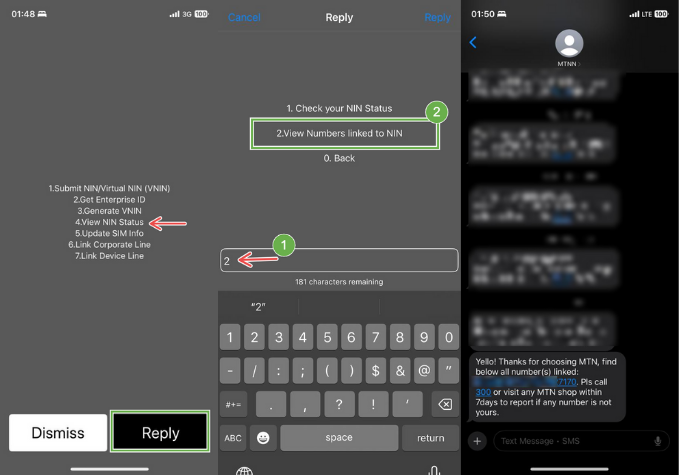
- Dial *996# on your phone.
- Select Option 4 – “View NIN Status.”
- Choose Option 2 – “View Numbers linked to NIN.”
You’ll get a list, but the message is often incomplete or incorrect. The system might also suggest calling 300 for help, as seen below—don’t bother. They’ll just tell you to visit an office.
Option 2: Use the NIMC app
- Download the NIMC app from the Play Store or App Store
- Proceed to set up required information if you’re downloading for the first time
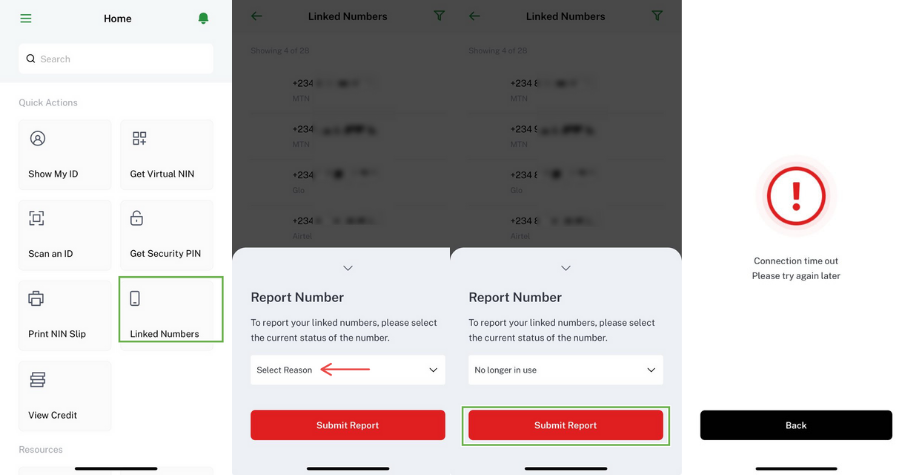
- Click “Linked Numbers” and select your network from the dropdown
- Review the full list of numbers tied to your NIN
If you spot a number you didn’t register or an old number from a lost/stolen phone, the app has a “Report” button. It doesn’t work. It’ll load briefly, throw an error, and leave you where you started.
How to actually delink unknown numbers
Visit your network provider’s office. This is the only method that consistently works.
What to bring:
- Your NIN (physical slip or saved on your phone)
- Valid ID (national ID card, driver’s license, or international passport)
- The phone number(s) you want to delink (write them down from the NIMC app)
Tips:
- Go early—offices get crowded fast
- Expect to wait, even if you arrive early
- If you have multiple networks to deal with (MTN, Airtel, Glo, 9mobile), prioritise the one with the most suspicious or inactive numbers
For MTN, Airtel, Glo, 9mobile users: The process is the same across all networks: walk in, show your NIN and ID, request delinking for specific numbers. The representative staff will verify your identity and remove the numbers from your NIN record on the spot or within 24-48 hours.
Get passive updates on African tech & startups
View and choose the stories to interact with on our WhatsApp Channel
Explore


